What Automation and AI Agents Actually Do
AI Automation
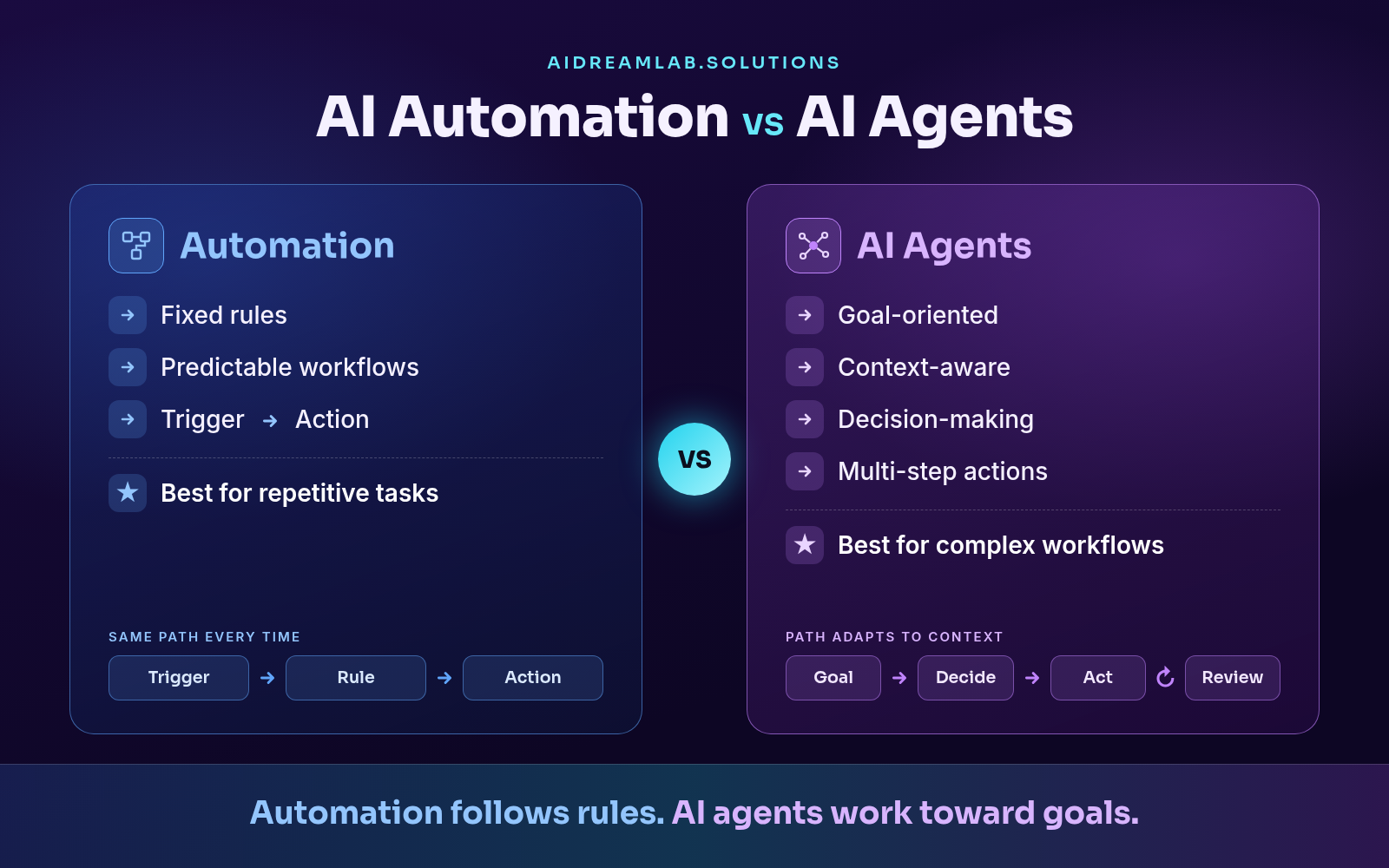
Automation follows rules you define in advance: when this happens, do that. It runs the same steps every time.
Typical examples: updating the CRM when a form is submitted, sending a welcome email sequence, alerting a manager when a deal changes stage, or sending a weekly report every Monday.
Some tools add AI to a single step, such as summarizing an email. The workflow itself stays fixed.
AI Agents
An AI agent is given a goal, not a script. It reads the context, decides what to do next, and uses your tools (CRM, inbox, calendar, knowledge base) to take several steps toward that goal.
Agents are not automatically right. They can misread context and make a confident but wrong decision. That is why good agents work within clear permissions, with approval steps for important actions and escalation to a person when they are unsure. New to the concept? Our beginner's guide to AI agents explains how they work.
AI Agents vs AI Automation: Side by Side
| Factor | AI Automation | AI Agent |
|---|---|---|
| Starts with | A trigger or schedule | A goal or request |
| Decisions | Predefined if/then rules | Chooses next steps from context |
| Flexibility | Same path every time | Path adapts to the situation |
| Unexpected cases | Fails or applies the wrong rule | Adjusts or escalates to a person |
| Predictability / risk | Highly predictable when rules are clearly defined | More flexible, but can misread context, so needs monitoring and review |
| Human role | Set up once, mostly hands-off | Reviews and approves at checkpoints |
| Best for | Repetitive, high-volume tasks | Variable work that needs judgment |
Automation follows predefined rules. AI agents work toward a goal using context and decisions.
Real Example: Handling a New Lead
A new lead fills in the contact form on your website.
With Automation
Rule-based automation can already route leads by structured fields such as company size or region, score them with predefined rules, and send different emails based on known conditions.
What it cannot do is read the message. "We are buried in invoices and need a fix before year-end" scores the same as "Just browsing."
With an AI Agent
The agent reads the free-text message and recognizes an operations director at a 200-person company with an urgent invoice-processing problem. It researches the company, marks the lead high priority, sends a relevant reply, and books a meeting with the salesperson who handles finance automation. Anything unusual is escalated for review.
The result: faster responses to high-value leads, and less manual sorting for your sales team.
The difference: automation handles what you can define in advance. An AI agent handles what has to be interpreted.
When to Use Automation vs an AI Agent
You do not need an AI agent for everything. Match the tool to the work.
Use automation when
The process is repetitive and predictable. Rules are fixed. Volume is high. No real judgment is needed.
Examples: invoice reminders, data syncing between systems, order confirmations, scheduled reports.
Use an AI agent when
There are several decision points. Inputs are unstructured, such as emails or documents. Situations change. The task combines research, decision, and action.
Examples: lead qualification, support triage, prospect research, handling order exceptions.
A quick decision test. Ask three questions about the task:
- Does it follow the same steps every time, with clear rules? Use business process automation.
- Does it depend on reading emails, documents, or conversations? Consider an AI agent, especially if you would need dozens of if/then rules and still miss edge cases.
- What happens if it gets it wrong? The higher the risk, the more human review you need.
Where agents typically add the most value:
- Sales: lead qualification, prospect research, and follow-ups. See our AI sales agent.
- Customer support: resolving common requests and escalating complex cases with full context. See our AI customer support solution.
- Marketing, operations, and finance: research, reporting, and coordinating approvals across teams. See our AI marketing automation and finance automation solutions.
For more use cases, see how AI agents are transforming businesses across industries.
Can Businesses Use Both?
Yes. Strong setups often combine all three:
Automation + AI Agents + Human Oversight
For a customer support request:
- Automation logs the ticket and sends an acknowledgement.
- An AI agent reads the request, checks order history, and resolves common issues.
- A person approves larger refunds and handles sensitive complaints.
This layered approach helps enterprise AI solutions stay reliable at scale.
A Practical Adoption Roadmap
- Identify repetitive work that consumes the most team hours.
- Map the current workflow, step by step.
- Separate rule-based steps from decision-based steps.
- Automate the predictable steps first for quick wins.
- Add an AI agent where context and decisions are needed. Start with one workflow, such as lead qualification.
- Keep human approval for high-impact actions.
- Measure business impact: time saved, response time, lead conversion, cost per process, and customer experience.
Common Mistakes to Avoid
Using AI agents where simple automation is enough. It adds cost without adding value.
Automating a workflow you have not mapped. A broken process just breaks faster.
Starting with the technology, not the business outcome. Define the problem first, then choose the tool.
Removing human oversight from payments, legal matters, or customer escalations.
Measuring AI adoption instead of business results. The number of AI tools in use says nothing about time saved or revenue gained.
Frequently Asked Questions
Are AI agents more expensive than automation?
Usually, yes. AI agents cost more to design, test, and run because they rely on AI models and need monitoring. That is why rule-based automation should handle predictable steps, with agents reserved for work where judgment creates measurable value.
Can Zapier or Make use AI agents?
Yes. Both platforms now offer AI steps inside workflows as well as dedicated agent features. The distinction is how they are used: a workflow with an AI step still follows a fixed path, while an agent decides which steps and tools to use. Many businesses start there and move to custom agents when they need deeper control.
The Better Question to Ask
The AI agents vs AI automation choice is not about picking a winner. The question is not "Should my business use AI?" It is:
"Which parts of my business should be automated, which should be handled by AI agents, and where should humans remain in control?"
At AI Dream Lab, we help businesses answer that question, then build the AI agents, automation, and AI-powered workflows that deliver measurable growth. Our AI consulting services start with your workflows, not the technology.